Why Your LLM "Hallucinates" on PDFs’ images (And How to Fix It)
We use PDFs every day—they are the universal language of research papers and business reports. While current Large Language Models (LLMs) are incredibly powerful at understanding both text and vision, they have a "blind spot" when it comes to PDFs that contain critical visual data.
If you’ve ever noticed your model giving an incorrect answer about a chart in a research paper, the problem isn't necessarily the model's intelligence—it's the processing pipeline.
The Problem: Text Tokens vs. Visual Tokens
When you upload a PDF to tools like NotebookLM, Gemini, or Google AI Studio, the system decodes the file. However, if the PDF doesn't store images as specific XObjects (a technical standard for how PDFs embed images), the model often fails to "see" the image as a picture. Instead, it tries to interpret it as a messy string of text tokens.
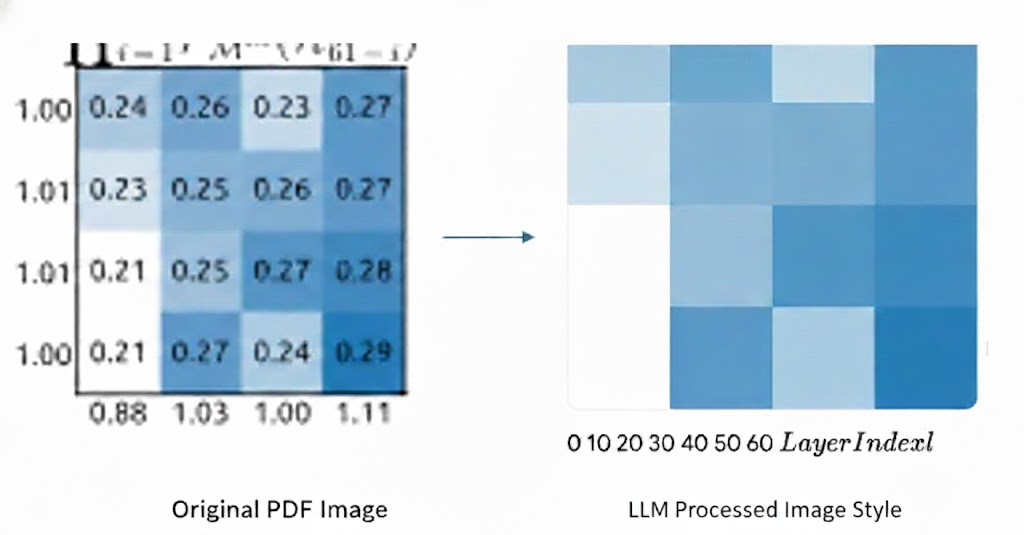
Figure 1: How LLM process image file in pdf
In the example above, even SOTA multimodal models can fail. Because the image isn't converted into a visual token, the model loses the spatial context and the data relationships within the graphic, leading to errors in understanding.
The Solution: The "Image-First" Workflow
My current solution is simple but effective: Convert the PDF pages into images (screenshots) before sending them to the LLM.
By feeding the model an image file (like a PNG or JPEG), you force it to engage its vision capabilities. It no longer tries to "read" the image as code or text; it "looks" at it as a visual context, which significantly improves accuracy for charts, diagrams, and complex layouts.
Automating the Process
To make this convenient, I used Claude Code to build a local LLM workflow. This script handles the "grunt work" of converting my PDF pages into high-quality images instantly, so I can jump straight into analysis.
The Trade-Off: The Token Cost
While this method is much more accurate, there is one significant "con" to keep in mind: Token Usage.
When you process a document as an image, the model consumes far more tokens than it would for a standard text-based PDF. This is because visual tokens are more data-intensive than text tokens.
| File Type | Data Representation | Token Count |
| PDF (Text) | Text Tokens | Efficient / Low |
| Image (PNG) | Visual Tokens | High |
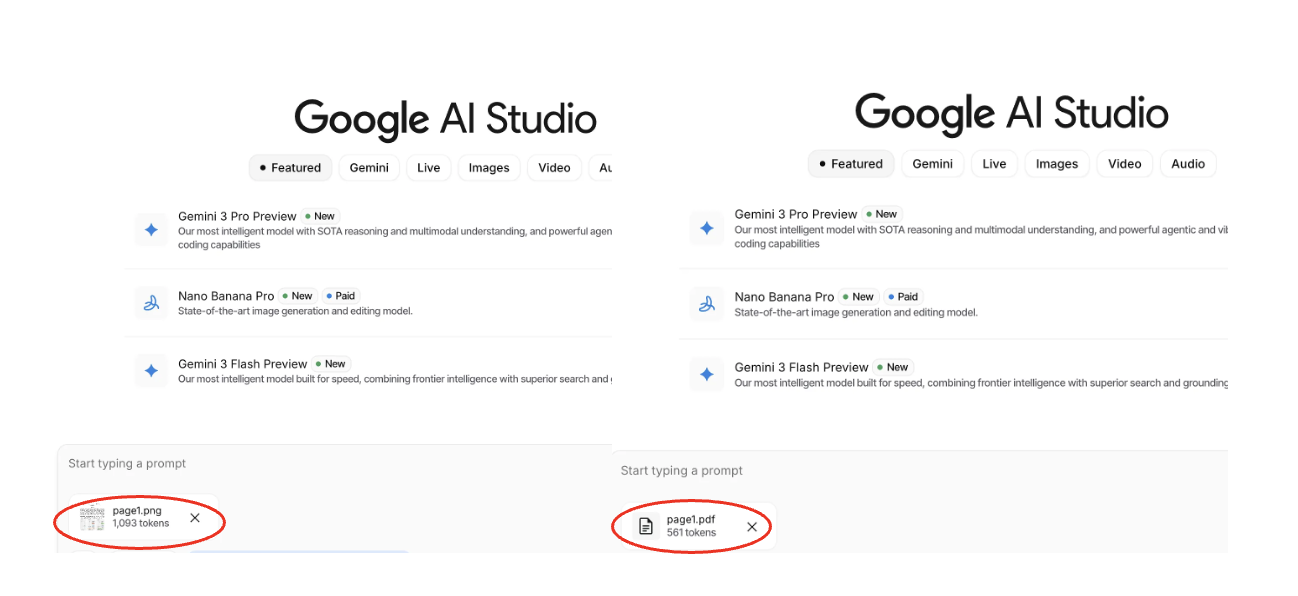
Figure 2: Token number comparison (Left: Image, Right: PDF)
As seen in Figure 2, the same content can take up vastly different amounts of your context window depending on the format.
Conclusion
If your PDF is 100% text, stick to the standard upload. But if you’re working with data-heavy research or technical diagrams, converting to images is the "pro move" to ensure your LLM actually sees what you're seeing.
Have you found a way to maintain visual accuracy without the high token overhead? I’d love to hear your thoughts or better methods in the comments!